Some links in this review are affiliate links. We may earn a small commission if you sign up, at no extra cost to you. We paid nothing for access and received nothing in exchange for this review: the testing below was done on a standard free account. Affiliate relationships do not influence our scores or our verdict.
Last updated: 22 September 2026
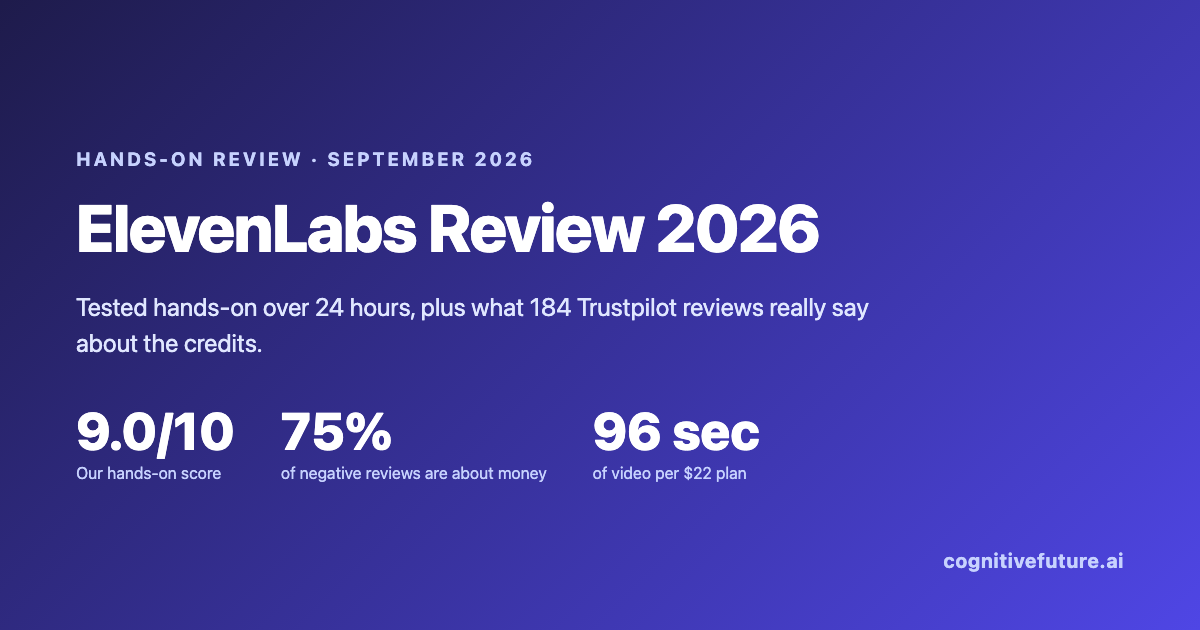
9.0 / 10 – the audio is worth the money. The credit meter is what will bite you.
We ran a 24-hour hands-on test across the ElevenCreative tools a new user meets first, then read the 184 most recent Trustpilot reviews to see whether our experience matched everyone else’s. It mostly did not, and the reason turned out to be the single most useful thing in this review.
Most ElevenLabs reviews are still written as if ElevenLabs were a text-to-speech company. It stopped being one. Sign up today and the first screen makes you choose between two entirely separate platforms, and the creative one ships with music generation, sound effects, image and video models, a template gallery and an automation builder sitting next to the voice tools you came for.
That matters more than it sounds, because all of it draws from the same credit balance. We spent 24 hours working through the tools a new user meets first to find out what is actually good, what is filler, and where the money goes. Then we did something we have not seen another review do: we pulled the 184 most recent Trustpilot reviews and classified every one of them, because ElevenLabs sits at a 3.0 TrustScore while the product itself keeps scoring well in tests like ours. Those two facts look contradictory. They are not.
Key takeaways
- We scored ElevenLabs 9.0/10 across six criteria after 24 hours of hands-on testing. Ease of use scored 10/10; output quality scored 8/10, because voice quality varies enough that you have to audition before you commit.
- Of the 184 most recent Trustpilot reviews (8 May to 15 September 2026), 90% are either 1-star or 5-star. Of the 92 negative ones, 75% raise billing, pricing or credit issues. Only 18% raise an audio-quality problem without also raising a money problem.
- Two voices, same script, same model, same settings: we scored one 6/10 and the other 8.5/10. Both clips are embedded below so you can judge them yourself. Voice selection moves the result more than any setting does.
- Every ElevenLabs product spends from one shared credit pool. On the $22 Creator plan’s 121,000 credits you get roughly 2.2 hours of narration, or 134 minutes of music, or about 96 seconds of top-tier AI video. Same balance.
- Unused credits roll over for a maximum of two months and are forfeited entirely if you downgrade or cancel. That is documented policy, not a trap, but it catches people: billing and credit problems account for 69 of the 92 negative Trustpilot reviews we read.
- The weakest tool we tested was image background replacement. Run on ElevenLabs’ own demo portrait it held together at a glance and fell apart on inspection, and on our own photos it was worse.
Table of contents
- How we tested ElevenLabs
- What ElevenLabs actually is in 2026
- Onboarding and first impressions
- How good is the voice library?
- What does ElevenLabs actually sound like?
- Music and sound effects: the biggest surprise
- Image and video: the weakest part
- Templates, and a first look at Flows
- The credit problem nobody explains
- What 184 Trustpilot reviews actually say
- What we would actually pay after testing
- Who should use ElevenLabs, and who should not
- Alternatives worth considering
- ElevenLabs pros and cons
- Frequently asked questions
- Final verdict
How we tested ElevenLabs
We used ElevenLabs over a 24-hour period on 15 and 16 September 2026, on a standard account on the free tier, working through the ElevenCreative product line in the order a new user would meet it: signup and onboarding, then Text to Speech, the voice library and its filters, Sound Effects, Music, Image & Video, and the Templates gallery. Every screenshot in this review is our own, taken during that session.
Two things this test is and is not. It is a first-run evaluation of breadth, usability and output quality across the ElevenCreative tools a new user meets first, which is the part of ElevenLabs that almost nobody reviews.
It is not a long-run production test. Twenty-four hours on a free balance does not stress the billing model, the rollover rules or customer support, and those turn out to be exactly where most unhappy users end up. Rather than guess at that gap, we filled it with the Trustpilot analysis further down, and we have been explicit throughout about which findings come from our hands and which come from other people’s.
What we did not test, and where to read about it instead. A single session cannot cover everything ElevenLabs does, so we are naming the gaps rather than glossing them. We did not clone a voice, which is its own decision with consent and cost implications covered in our voice cloning guide and, at category level, in how AI voice cloning actually works and the best voice cloning tools. We did not run a long-form Studio project, which is the workflow that matters for podcasts and audiobooks. We did not run dubbing or speech to text, both of which carry much higher credit costs than narration and deserve their own test. We did not build anything on ElevenAgents, the enterprise side of the platform, explained separately in what AI voice agents are. And we did not test Flows, the automation builder, which is too new to judge in a day.
Pricing, credit costs and plan limits were read directly from ElevenLabs’ own pricing page and API pricing page on 16 September 2026. Per-generation credit costs for the video models are not published on either page; those figures come from our own screenshots of the in-app model picker.
| Criterion | Score | What drove it |
|---|---|---|
| Onboarding and setup | 9/10 | Platform choice and use-case selection up front, working editor in under two minutes |
| Ease of use | 10/10 | Every tool follows the same pattern: prompt bar at the bottom, settings on the right |
| Features | 8/10 | Unusual breadth, but the visual tools are clearly younger than the audio ones |
| Output quality | 8/10 | Measured spread of 6/10 to 8.5/10 across two voices at identical settings. The good ones are excellent; you have to audition to find them |
| Value for money (audio workloads) | 10/10 | Scored against published audio rates at entry-tier prices only. It would not survive a video-heavy workload, and it does not price in the credit-forfeiture rule |
| Speed and performance | 9/10 | No waiting worth mentioning on audio generation during the session |
| Overall | 9.0/10 | Unweighted mean of the six criteria above |
Each criterion is scored 1–10 by the reviewer against what the tool promises for that job, and the overall figure is a simple unweighted average. It is a judgement, not a measurement. Our research and review methodology explains how we handle scoring, sourcing and disclosure, including when a claim comes from first-hand use rather than documentation.
What ElevenLabs actually is in 2026
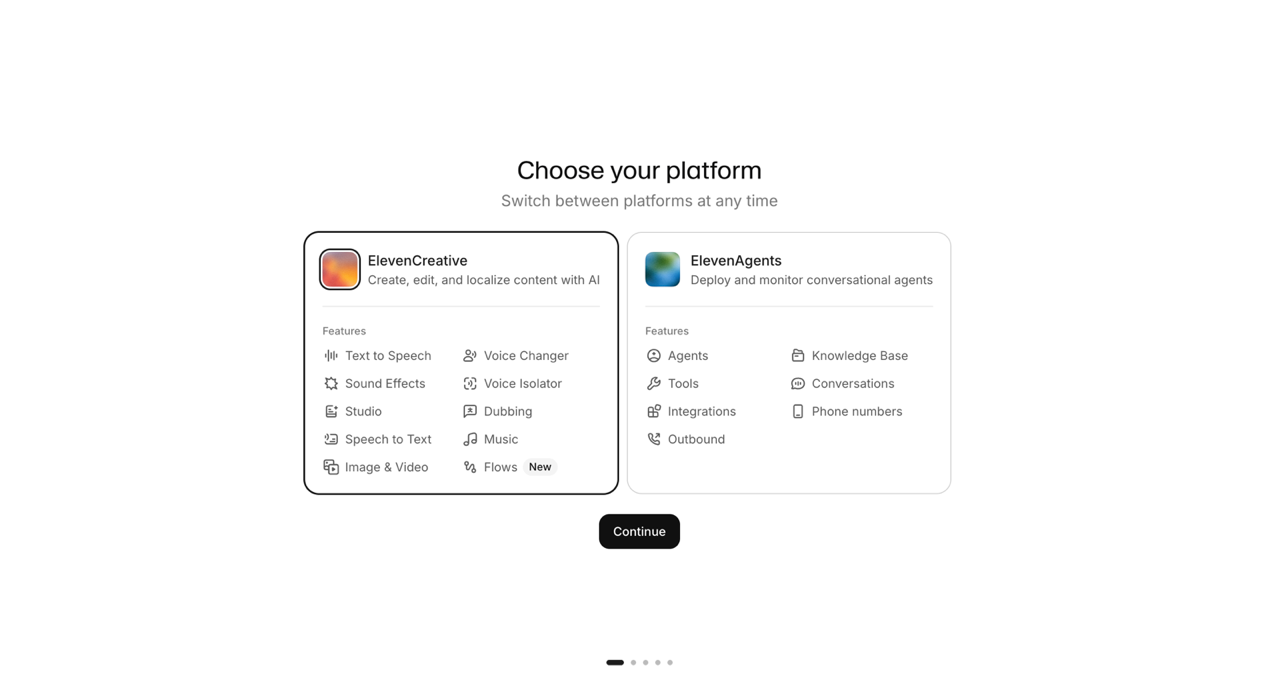
ElevenLabs is now two products under one login, and the first thing it does after signup is make you pick one. ElevenCreative is the content-production platform: text to speech, voice changer, sound effects, voice isolator, Studio, dubbing, speech to text, music, image and video, and a new automation builder called Flows. ElevenAgents is the enterprise side: conversational agents, knowledge bases, tools, integrations, phone numbers and outbound calling. You can switch between them later, but the split tells you how the company now sees itself.
That context is worth holding on to, because it explains the company’s direction and its pricing. ElevenLabs closed 2025 with over $330 million in annual recurring revenue and raised a $500 million Series D at an $11 billion valuation in February 2026, with the company saying it is doubling down on ElevenAgents, the enterprise conversational platform (ElevenLabs, 4 February 2026; the round was also reported by TechCrunch). The creative suite most readers of this review care about is no longer the centre of the business. It is still where most of the new features land.
Onboarding and first impressions
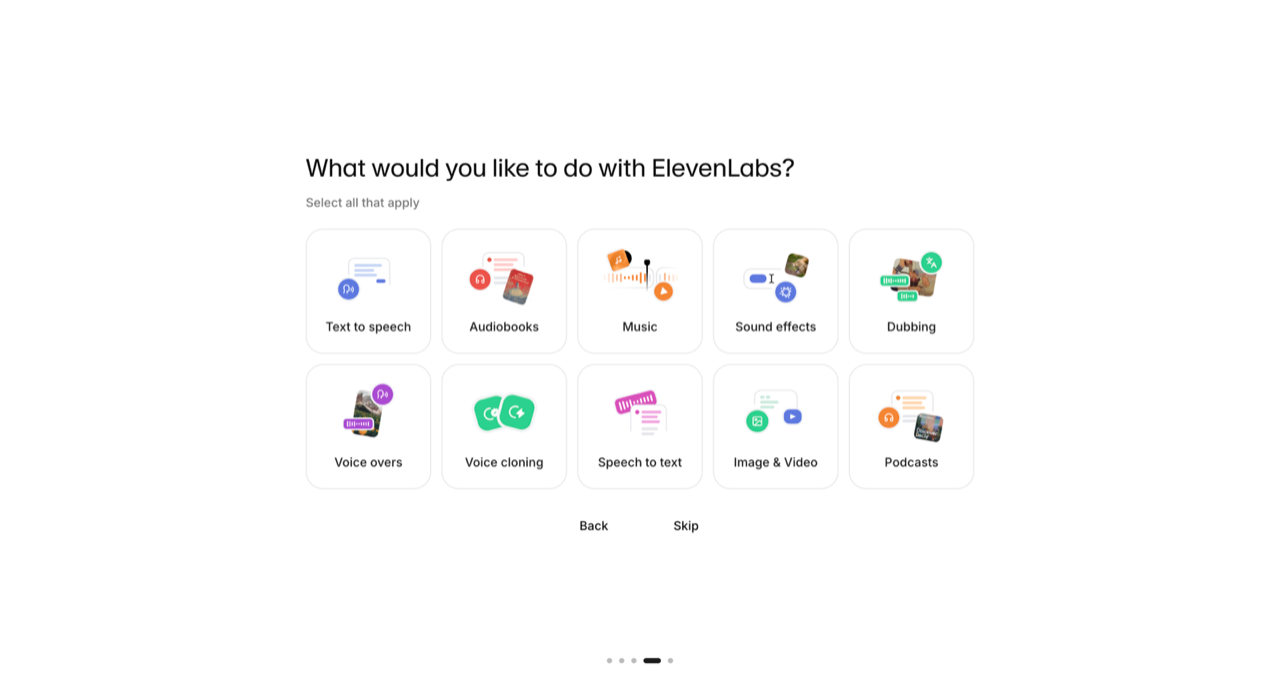
Onboarding is the best part of the product and we scored it 9/10. After the platform choice you get a short sequence of preference screens, including a grid asking what you want to do: text to speech, audiobooks, music, sound effects, dubbing, voice overs, voice cloning, speech to text, image and video, or podcasts. Pick any combination or skip it. From landing page to a working Text to Speech editor took under two minutes with no credit card, no sales call and no email verification wall.
Ease of use scored 10/10, and the reason is consistency. Every tool we opened uses the same layout: a prompt or text field, a floating composer bar along the bottom with the model and output settings, and a settings rail on the right. Once you have used one, the next one needs no explanation. The Text to Speech screen defaults to a voice called Roger on the Eleven Multilingual v2 model, with sliders for speed, stability, similarity and style exaggeration, plus eight starter prompts along the bottom if you have nothing to paste in.
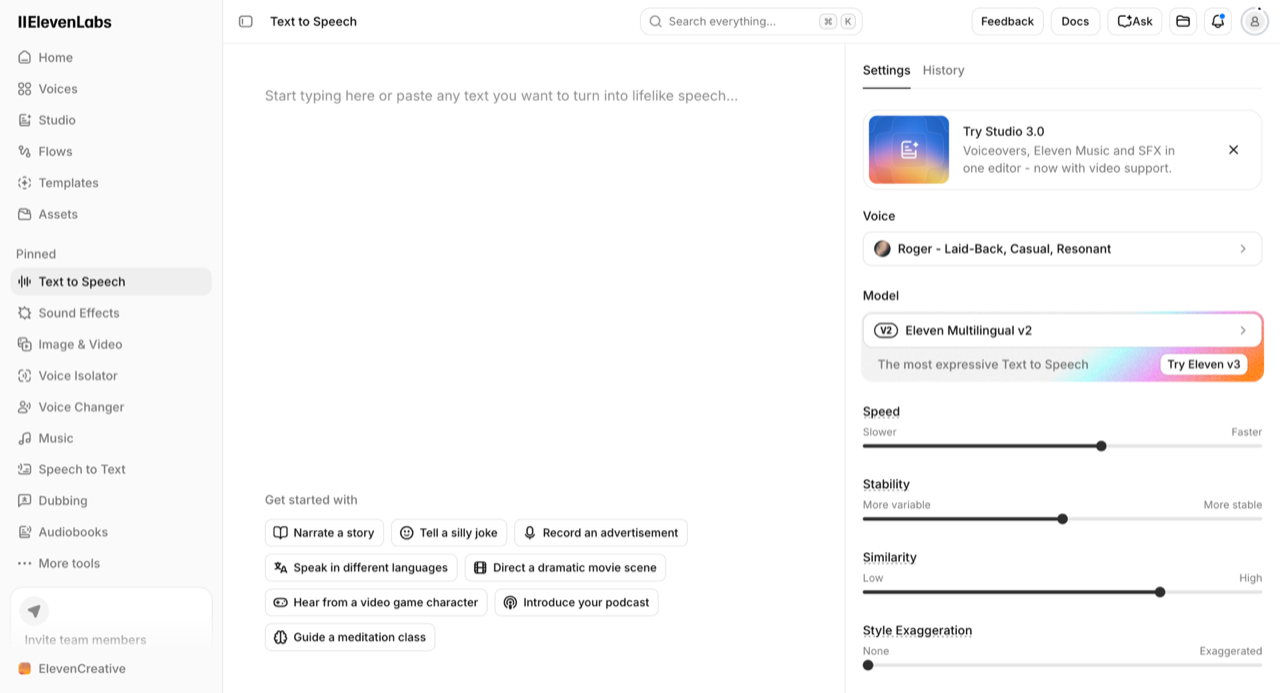
If you are coming from a single-purpose voice tool, the density here is the adjustment. The left navigation alone carries Home, Voices, Studio, Flows, Templates and Assets before you reach the pinned tool list. Nothing is hidden, but nothing is prioritised for you either.
How good is the voice library?
The library is the strongest single reason to pick ElevenLabs, and the accent coverage is the part that surprised us most. With the language filter set to English, the library returned 10,549 voices. That number alone is marketing. What is not marketing is the accent filter underneath it.
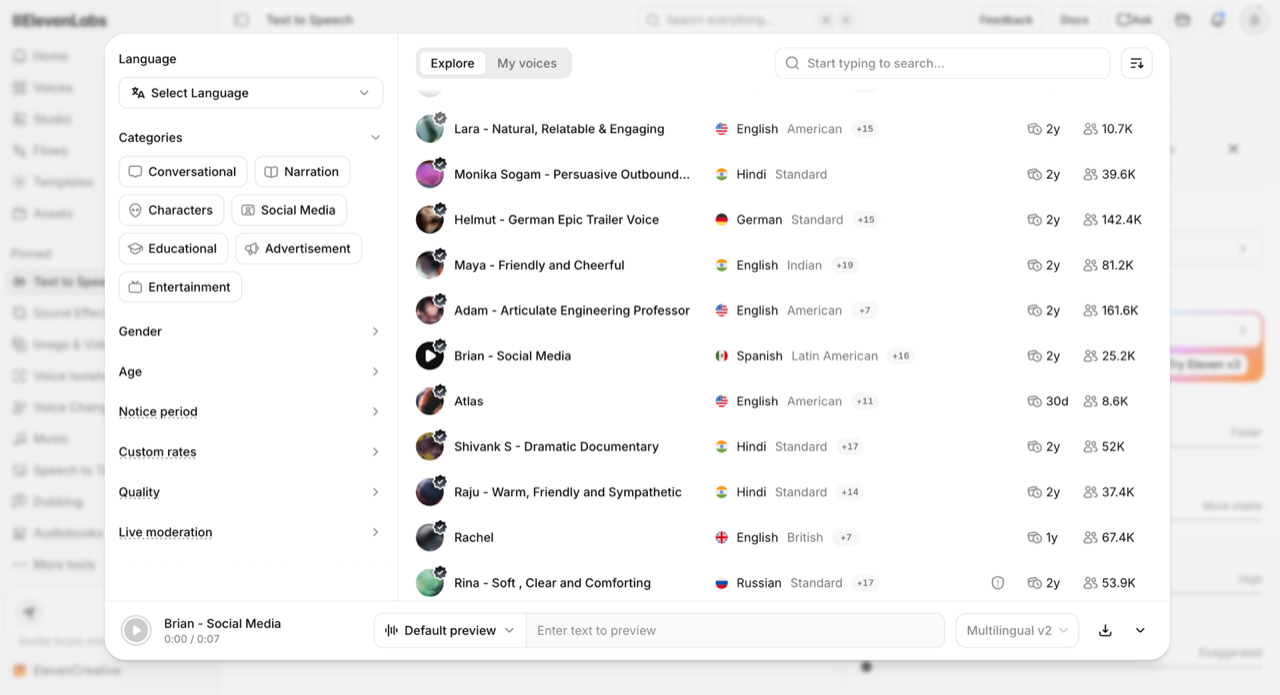
Filtering English by accent gives you American, Australian, British, Canadian, Indian, Irish, Jamaican, New Zealand and Nigerian at the top of the list. Keep scrolling and it gets more specific than anything we have seen in the voice tools we have reviewed: African American, Singaporean, Cockney, and then regional US options broken out individually as US-Boston, US-Chicago, US-New York, US-Southern, US-Midwest and US-Northeast.
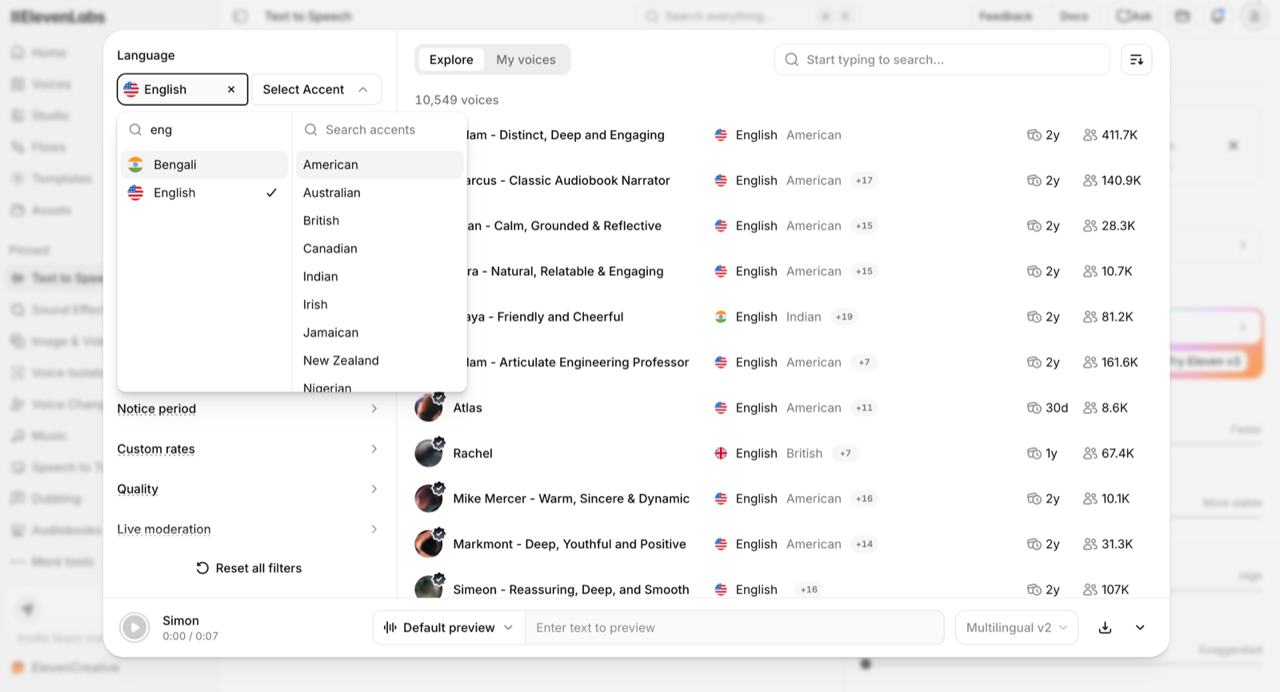
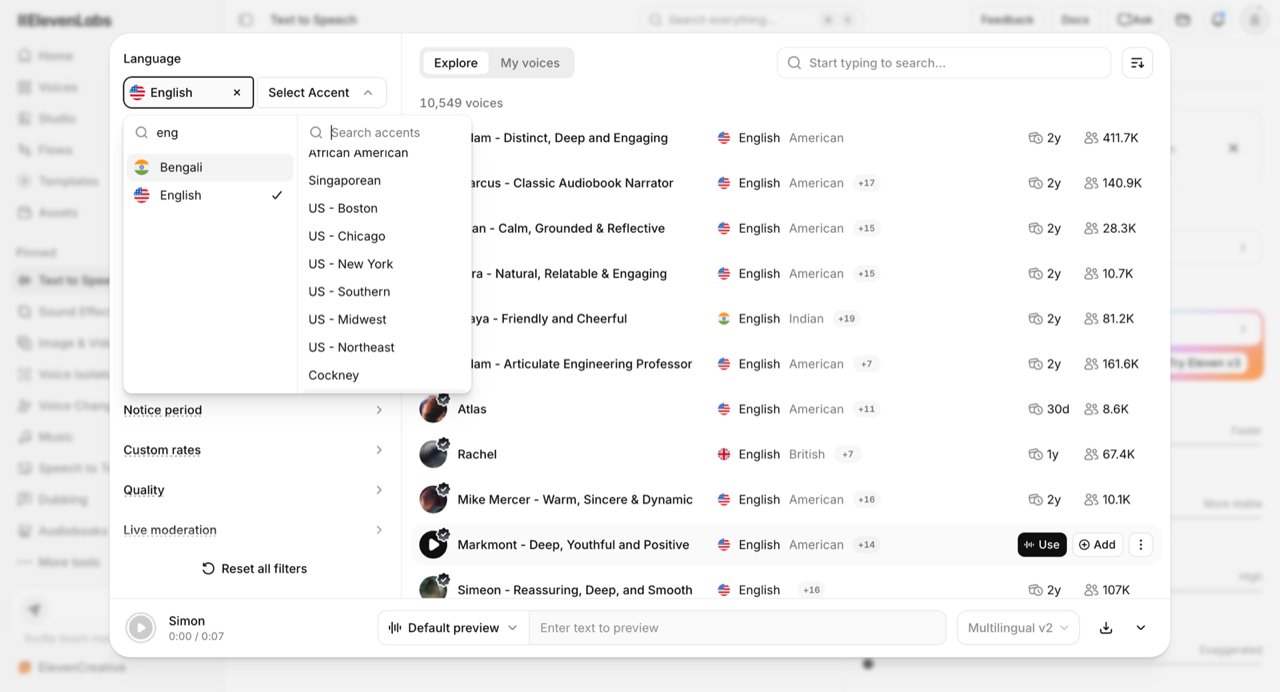
If you produce localised ad creative or regional YouTube content, that granularity is a real advantage, and it is the kind of thing that never appears on a pricing page. A Boston read and a Midwest read land very differently in a US regional campaign, and most platforms give you one generic American option.
Eleven v3 or Multilingual v2: which model should you pick?
Pick Multilingual v2 for consistency and Eleven v3 for performance. v2 is the default in the Text to Speech editor and it is the safer choice for straight narration: 29 languages, stable over long generations, and one credit per character. Eleven v3 is the expressive model, covering 70 languages and more, with audio tags that let you direct delivery inline, and it is the better choice for character work, ads and anything that needs emotion. On pay-as-you-go API rates the two list at the same $0.10 per 1,000 characters, while the Flash and Turbo models come in at $0.05 with lower latency and 32 languages (ElevenLabs API pricing, retrieved 16 September 2026). Our Eleven v3 review goes through the model in detail, and AI voice vs human voice actors covers where either model still falls short of a booked performer.
The honest caveat, and it is why output quality scored 8/10 rather than 10: the quality across those voices is not uniform. Some voices sound noticeably AI-generated. Others are very good, good enough that we would ship them. We put numbers on that in the next section, where two voices at identical settings scored 6/10 and 8.5/10. The difference between a passable ElevenLabs voiceover and an excellent one is almost entirely voice selection, not settings, and there is no shortcut: you have to audition. Budget real time for it on your first project, and once you find a voice that works for your brand, stay on it.
That caveat shows up in other people’s experience too. Among the recent Trustpilot reviews we read, one recurring complaint from audiobook and long-form narrators was that delivery speed and volume can drift within a single long generation, which is a different problem from voice selection and one a 24-hour test will not surface. If you are producing long-form narration specifically, read our deeper write-ups on using ElevenLabs for audiobooks and choosing the best ElevenLabs voices before committing to a plan.
What does ElevenLabs actually sound like?
Every other section of this review can be argued from screenshots. This one cannot, so here are two clips you can listen to. Both were generated during the test on 16 September 2026 from the same script, on the same model, with identical settings: Eleven Multilingual v2, speed 1.00, stability 50, similarity boost 75, style exaggeration 0, speaker boost on. The only variable is the voice.
Eleven Multilingual v2 · speed 1.00 · stability 50 · similarity 75 · style 0 · 13.8 seconds
Our score: 6 / 10. Usable, and the weaker of the two by a clear margin. This is the result that makes the auditioning advice necessary rather than optional.
Eleven Multilingual v2 · speed 1.00 · stability 50 · similarity 75 · style 0 · 12.2 seconds
Our score: 8.5 / 10. Audibly better than Alice, and the best result we got in the test. This is the level ElevenLabs is capable of once you have found the right voice.
A 2.5-point spread from voice selection alone. Same script, same model, same six settings, and the difference between a 6 and an 8.5 is which name you picked from a dropdown. That is the single most useful thing we learned about ElevenLabs, and it is the reason the output-quality score in our table is an 8 rather than a 10: the ceiling is high, the floor is ordinary, and nothing in the interface tells you which one you are standing on.
One measurable difference before you listen. The identical script runs 13.8 seconds in Alice and 12.2 in Adam, a 13% gap in delivery length at the same speed setting of 1.00. Speed on the settings rail is a multiplier on a pace the voice already has, not an absolute, which matters if you are cutting narration to a fixed video length.
Deliberately, we are not going to describe how each clip sounds. You can play both, and your brief is not ours. What we will say is what we would do differently next time, which is what the reviewer said when asked to summarise it: try a range of voices yourself and pick the one that suits the specific thing you are making. Budget real time for that on your first project. Our guide to the best ElevenLabs voices by use case is a shortcut, not a substitute.
One caveat on what this pair does and does not show. Alice is a premade library voice and Adam is a professional voice clone, so the two sit in different categories. Two clips cannot establish that cloned voices beat premade ones in general, and we are not claiming that. What they do establish is that two voices you can pick from the same library, at identical settings, produced results we scored 2.5 points apart.
Both clips are unedited single generations, downloaded straight from the platform with no post-processing, no retakes and no best-of selection. We are publishing the first output in each case.
Music and sound effects: the biggest surprise
Music generation was the feature we did not expect to rate highly and did. It is a full text-to-music generator sitting in the same sidebar as the voice tools, it is included in the same credit balance, and commercial use is licensed from the $6 Starter plan upward according to ElevenLabs’ pricing page. For a creator who currently pays a separate subscription for stock music, that consolidation is the most immediately valuable thing in the suite.
Sound Effects works the same way: describe a sound, get a royalty-free clip, with looping and duration controls and an Explore feed of what other users have generated. Our composer showed a cost of 200 credits for a generation against a remaining balance of 9,821 credits, which matches the 200 credits per generation that ElevenLabs publishes in its pricing FAQ.
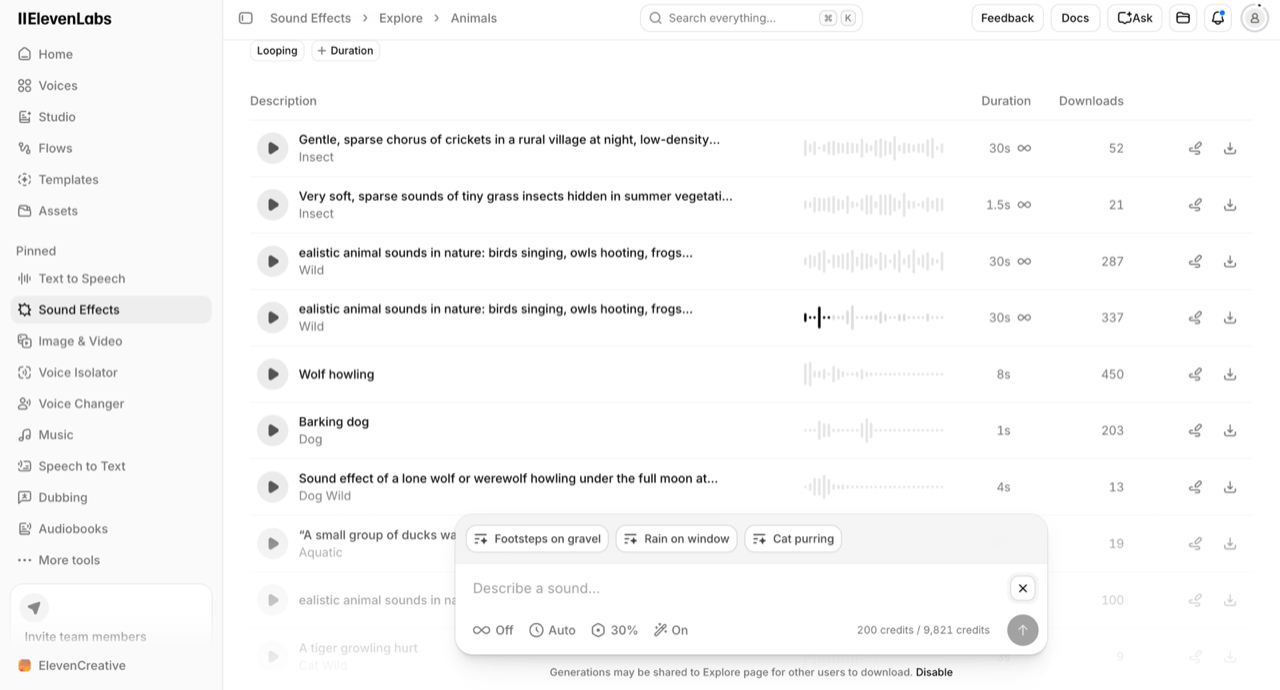
Both tools are fast, both are genuinely useful, and both are the clearest argument for the bundle. If you are a faceless-channel creator who currently pays for a voice tool, a music library and a sound effects library separately, ElevenLabs replaces all three from one balance.
Image and video: the weakest part
This is where ElevenLabs stops being convincing. Image and video generation is among the most recently added parts of the suite, it is the part we scored hardest, and it is the reason our Features score is an 8 and not a 9.
The Image & Video section is a model router rather than a model. Switch it to Video and you get a picker offering Seedance 2.5, Seedance 2.0, Seedance 2.0 Fast, Gemini Omni Flash 1.1, Gemini Omni Flash 1.1 Extend, MiniMax H3 and MiniMax H3 Max, each with a credit price attached, plus filters for Realistic, Upscaling, Editing, Audio, Fast and Low Cost. There is also an Avatars row with named presenter characters for talking-head content.
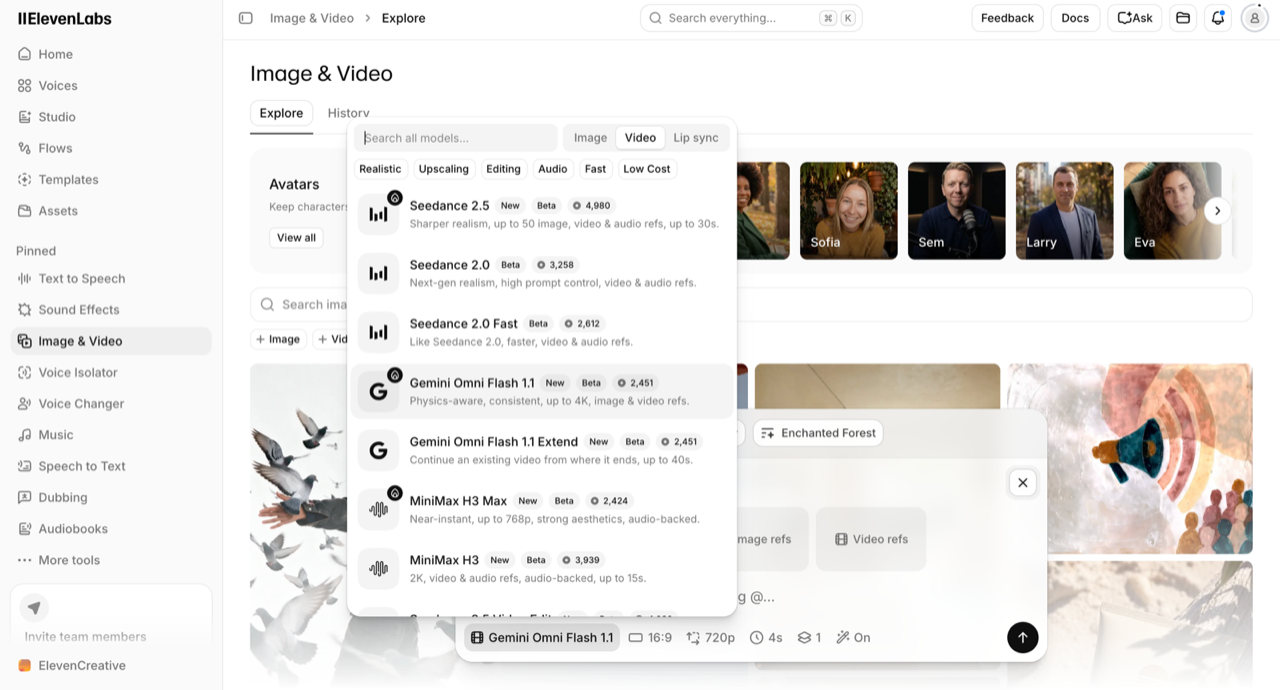
Those credit figures are worth pausing on, because as far as we can tell they appear nowhere in ElevenLabs’ public pricing. The pricing FAQ lists credit costs for text to speech, speech to text, music, sound effects, voice changer, voice isolator and dubbing. Video is absent. You only see the price once you are inside the app with an account, which is exactly the wrong order for a purchasing decision.
Then we tested the output. The Templates gallery includes a one-click Change background template, which takes an input image plus a text description and swaps the background. We ran it on ElevenLabs’ own example image with the prompt “I want Paris during the winter in the background”, at a quoted cost of roughly 518 credits.
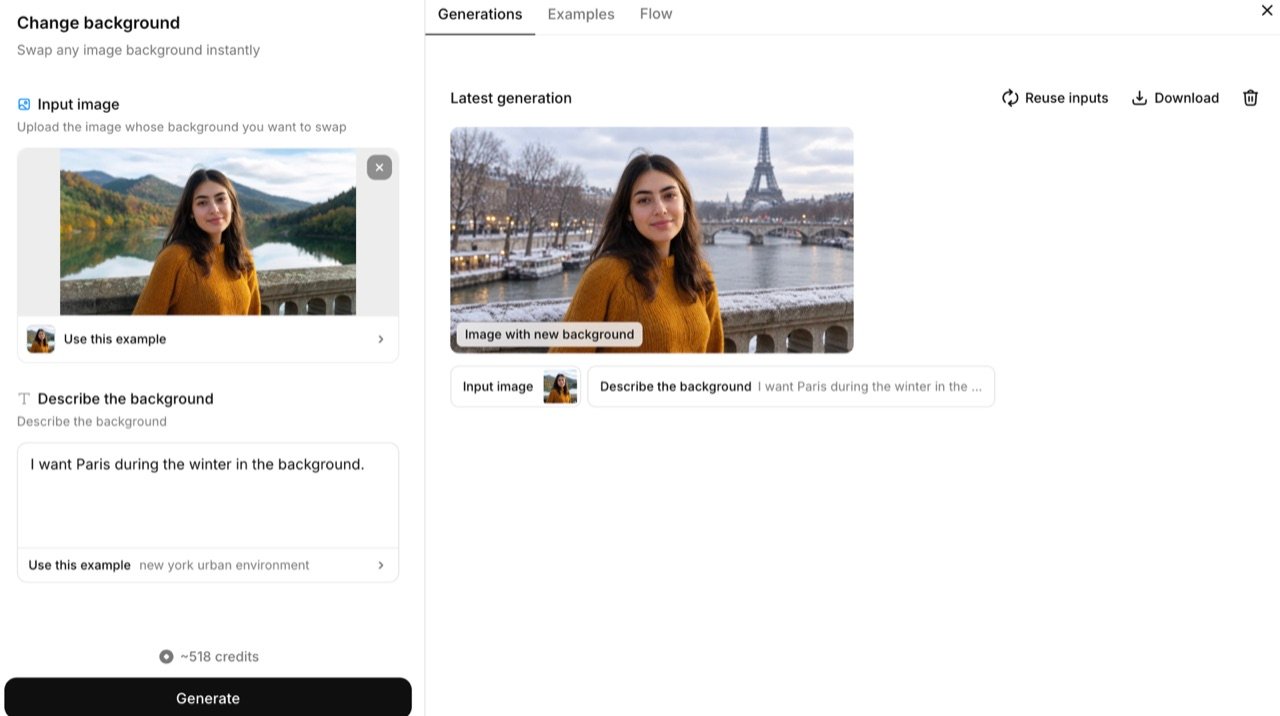
The composite holds together at a glance and falls apart on inspection. The subject reads as pasted in, the lighting on the face does not match the flat winter light behind her, and the whole frame has the soft, slightly plastic quality that makes a viewer suspicious without being able to say why. Worth being precise about what that run was: the input was ElevenLabs’ own demo portrait, the most favourable case the template has, and it still landed here. Repeating the workflow on our own photographs produced visibly worse composites, though we are not publishing those images.
Two honest qualifiers. This was a first attempt with a deliberately simple prompt, and image models respond strongly to prompt detail, so a more careful prompt would likely do better. And this is a single template, not the whole image stack. But the point of a one-click template is that it should work on one click, and the gap between the audio tools and the visual tools here is wide enough that we would not put this output in front of a brand client.
That is the clearest practical boundary in this review. For a faceless YouTube channel or a straightforward e-commerce ad, the visual tools are fine. For high-branding D2C creative where visual quality and brand consistency carry the campaign, they are not, and you should keep using whatever you use today. If video is your main output rather than a garnish on the audio, our roundup of the best AI tools for video production is the better starting point.
Templates, and a first look at Flows
Templates is the part of ElevenCreative most likely to get used by people who do not think of themselves as prompt engineers, and it is well built. The gallery is organised by category (Image Tools, Video Effects, Product Shots, Mockups) and the entries are specific jobs rather than demos: upscale an image 4x, swap a character in a scene, compare image models on the same prompt, change a background, generate a book cover from a synopsis, turn a product photo into nine hero shots, build a packaging mockup, create a UGC-style video from a product photo, swap a character in an existing video.
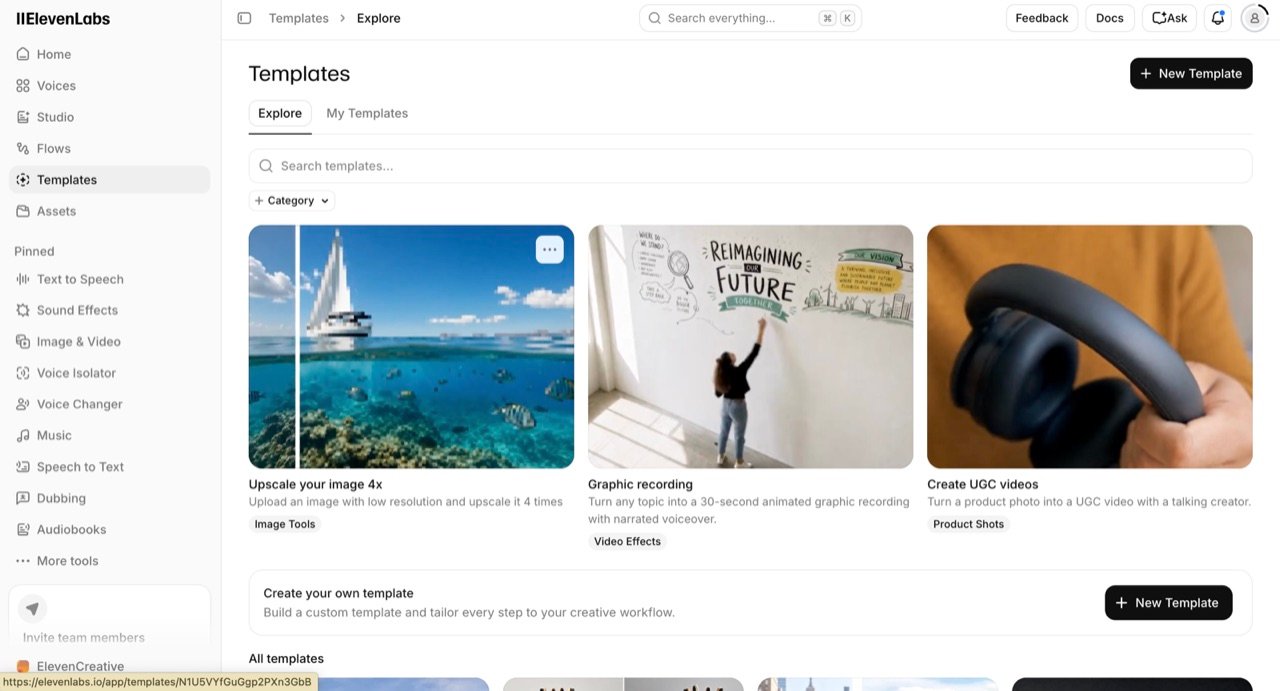
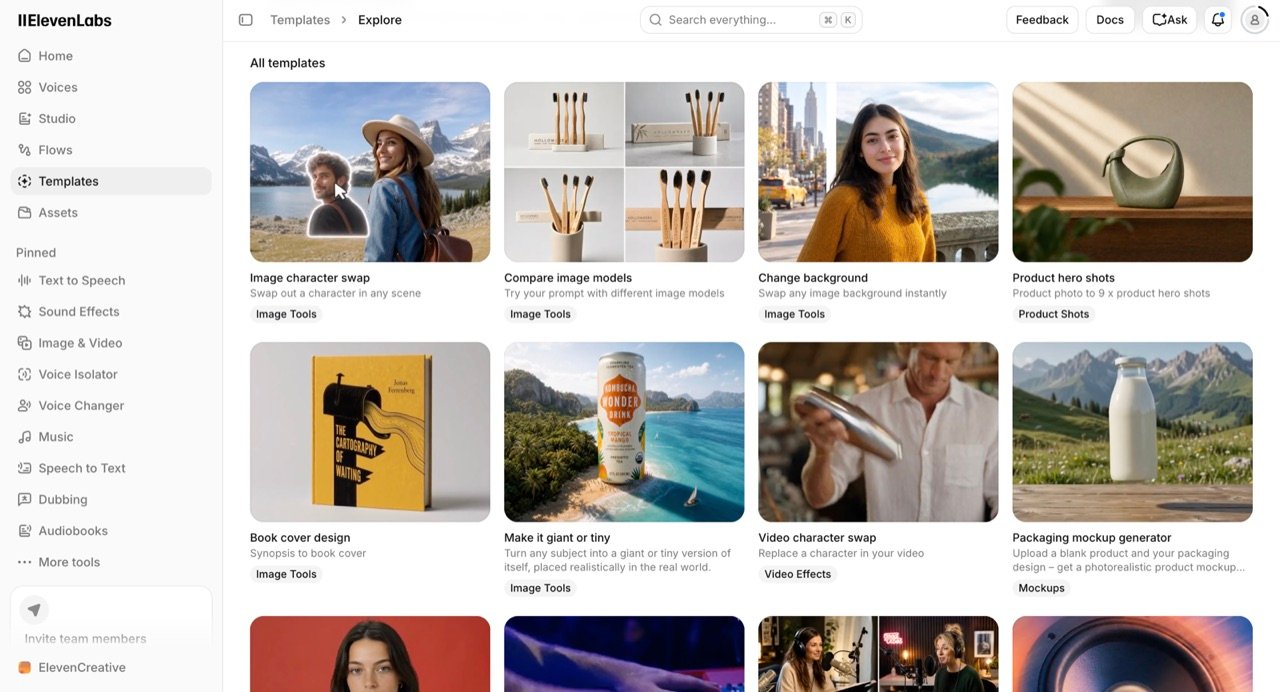
You can also build your own template, which is the bridge to Flows, ElevenLabs’ automation builder and the newest item in the sidebar. We did not test Flows in depth in 24 hours, so we are not scoring it. What the template library does tell you is who ElevenLabs is now chasing: the product-shot, packaging-mockup, UGC-video end of e-commerce marketing, not just narration.
The credit problem nobody explains
Here is the single most useful thing in this review, and it is the thing that reconciles our 9.0 score with ElevenLabs’ 3.0 rating on Trustpilot. Every product on the platform spends from one shared credit pool, and the products have wildly different appetites. ElevenLabs states this plainly in its pricing FAQ: using one product leaves fewer credits for the others.
What each product costs in credits
The published rates, read from ElevenLabs’ pricing page on 16 September 2026, are as follows.
| Product | Credit cost |
|---|---|
| Text to Speech | 1 credit per character on Multilingual v2. Flash and Turbo bill at 0.5 to 1 credit per character for API usage, so treat this as the baseline rate rather than the only one |
| Sound Effects | 200 credits per generation |
| Speech to Text | 330 credits per minute |
| Eleven Music | 900 credits per minute |
| Voice Changer, Voice Isolator | 1,000 credits per minute |
| Dubbing | 2,000–10,000 credits per minute depending on mode and watermark |
| Video generation | 2,424–4,980 credits per 4-second clip (not published; measured in-app) |
What $22 a month actually buys
Put those rates against a real plan and the shape of the problem appears. The $22 Creator plan includes 121,000 credits per month. Spent entirely on one product, that balance buys:
| If you spend it all on… | You get roughly |
|---|---|
| Speech to text | 6.1 hours of transcription |
| Narration (Multilingual v2) | 121,000 characters, about 19,800 words, roughly 2.2 hours of speech |
| Sound effects | 605 generations |
| Music | 134 minutes |
| Dubbing Studio, no watermark | 12 minutes |
| Video on Seedance 2.5 | 24 clips, about 96 seconds of footage |
Assumptions behind that table, so you can check it: narration converted at 150 words per minute and about 6.1 characters per word including spaces; video priced at Seedance 2.5’s 4,980 credits for a single 4-second 720p clip, which is the most expensive of the six models and the shortest clip length.
If you want the plan-by-plan version of this, with annual billing, overage behaviour and top-up credits worked through properly, our ElevenLabs pricing breakdown covers it. This section is about what the meter does, not what the plans cost.
Read the first and last rows together. The same $22 buys either 2.2 hours of finished narration or 96 seconds of AI video. One 4-second Seedance 2.5 clip costs 4,980 credits, which is the same as 4,980 characters of speech, which is roughly 800 words, which is about five minutes of voiceover. Four seconds of video, five minutes of narration, identical price.
The pricing itself is defensible: it reflects what the underlying models cost to run. The disclosure of those costs before purchase is the weaker part. But it means a creator who signed up for voiceovers, spent a month happily narrating, and then spent one afternoon experimenting with the shiny new video tab can watch a month’s allowance vanish in an hour and have no idea why.
The credit meter is a single number. The things it pays for do not cost anything like the same. Per minute of finished output, the same meter charges 330 credits for transcription, about 915 for narration, 900 for music, 10,000 for unwatermarked Dubbing Studio and roughly 74,700 for Seedance 2.5 video, that last figure extrapolated from the 4-second clip price at 15 clips a minute, because ElevenLabs does not publish a per-minute video rate. That is a spread of more than 200 to one, and nothing in the interface signals it before you spend.
The interface makes this concrete. As soon as a text-to-speech generation finishes, ElevenLabs offers to turn it into a talking video, one button away from the audio you just made. Our thirteen-second clip cost on the order of 200 credits. Accepting that suggestion moves you to a tool priced between 2,424 and 4,980 credits for four seconds. Nothing in the panel says so.
Three rules that compound the problem
Three further rules from the pricing FAQ compound this, and they are worth knowing before you subscribe rather than after:
- Credits are charged per generation request, not per download. If you generate something and dislike it, you have still paid. ElevenLabs offers a limited number of free regenerations, flagged before you generate, provided the content and certain settings do not change.
- Rollover is capped and conditional. Unused credits roll over for up to two months, to a maximum balance of 3x your monthly quota, and only while you hold an active paid subscription. Rollover does not apply to the free plan.
- Downgrading or cancelling forfeits unused credits at the end of the cycle. You do not keep what you paid for and did not spend.
That last rule is documented and it is not hidden, but it is the one that surprises people: billing, pricing and credit problems account for 69 of the 92 negative reviews in our Trustpilot sample, and losing credits to expiry or cancellation is named in 5 of them.
What 184 Trustpilot reviews actually say
ElevenLabs holds a 3.0 TrustScore across 1,147 Trustpilot reviews, ranked 327th of 347 companies in Trustpilot’s Software Company category (Trustpilot, retrieved 16 September 2026). For a product we had just scored 9.0, that is a gap worth explaining rather than ignoring, so we read the reviews.
We collected the 184 most recent reviews, covering 8 May to 15 September 2026, recorded each one’s star rating and text, and classified the text by which subjects it raised. The first finding is the distribution itself: 82 one-star, 10 two-star, 4 three-star, 5 four-star and 83 five-star. Two ratings account for 165 of the 184.
What the negative reviews are about
That distribution does not look like ordinary middling satisfaction, which would cluster around the middle of the scale. It suggests users are having unusually polarised experiences, though review platforms carry selection effects of their own, so the split is a prompt to look closer rather than a finding in itself. We looked at what each camp was actually talking about.
Among the 92 negative reviews (1 and 2 stars), 69 – three quarters of them – raise billing, pricing, subscription handling or credit consumption. Only 17, or 18%, raise an audio-quality problem without also raising a money problem.
What the positive reviews are about
The positive side is just as revealing. Of the 88 four- and five-star reviews, 46 mention customer support, and 28 of those praise the support experience without mentioning voice or audio quality at all. A meaningful share of ElevenLabs’ five-star reviews are not reviews of the product. They are reviews of the person who fixed a billing problem.
Read enough of them and the same sentence keeps appearing in different words: the technology is good, the commercial experience is not. One reviewer titled a one-star review “Excellent technology, unacceptable billing and customer support” (AJ, 1 star, updated 18 August 2026). Another, also one star, wrote that “the product is great you just loose [sic] money trying to work out their interface” (Dean W, 7 September 2026). From the other side, a five-star reviewer wrote “I don’t understand why this company is rated 3.0” (Sophia, 18 August 2026).
What this means for you: if you are trying to decide whether ElevenLabs makes good audio, the Trustpilot score is close to useless and our 9.0 is the better guide. If you are trying to decide whether to put a card on file, the Trustpilot score is the more important number of the two.
The mitigation is specific rather than vague. Start on the free tier. Move to Starter at $6 before Creator at $22. Do your video experiments early in a billing cycle, not late. And do not treat accumulated credits as savings, because cancelling forfeits them.
How we did this, and its limits. We collected the 184 most recent reviews from Trustpilot’s public listing for elevenlabs.io on 16 September 2026, recorded star rating, date and text for each, and tagged each review by keyword matching against subject groups (billing and pricing terms, credit and token terms, support terms, audio terms, image and video terms). Keyword classification over-counts reviews that mention a subject in passing and misses reviews that describe one without using its vocabulary, so treat the percentages as indicative rather than precise. Trustpilot reviews are self-selected and skew toward strong experiences in both directions; 159 of the 184 were labelled unprompted and 21 were invited. Trustpilot states it does not fact-check reviews. One reviewer in our sample noted that posting a review was what finally prompted a support response, which is its own kind of selection effect. Review counts drift daily, so figures will differ if you check later.
What we would actually pay after testing
ElevenLabs is good value on audio workloads and poor value on video workloads, and the plan table is the same either way. All figures below were read from ElevenLabs’ pricing page on 16 September 2026. Annual billing is charged as ten months, so a yearly commitment is effectively two months free.
| Plan | Monthly | Credits / month | Unlocks |
|---|---|---|---|
| Free | $0 | 10,000 | Evaluation only. Text to speech, sound effects, music and image generation are all usable, but there is no commercial licence and no credit rollover |
| Starter | $6 | 30,000 | Commercial licence, instant voice cloning, music commercial use, dubbing studio, video generation |
| Creator | $22 ($11 first month) | 121,000 | Professional voice cloning, top-up credits. The plan most creators land on |
| Pro | $99 | 600,000 | 44.1 kHz PCM via API, 192 kbps audio |
| Scale | $299 | 1,800,000 | 3 seats, 3 professional voice clones, team collaboration |
| Business | $990 | 6,000,000 | 10 seats, 10 professional voice clones, low-latency TTS from 5c/minute |
Two practical notes the table does not capture. First, the free plan carries no commercial licence, so anything monetised needs Starter at minimum. Second, annual billing, overage behaviour, top-up credits and the pay-as-you-go API rates all change the real number you pay, and they need more room than a review should give them. If you are buying through the API rather than the app, our comparison of the best text-to-speech APIs for developers prices ElevenLabs against the alternatives per character. Our plan-by-plan pricing breakdown, linked earlier, covers all of it, including the credit multiplier and how to avoid a surprise bill.
Our own answer, after the test: we would run the free tier for as long as it takes to audition voices, then Starter at $6 for anything published, and we would only move to Creator once real work, not experiments, was exhausting the balance.
Who should use ElevenLabs, and who should not
After 24 hours across the tools we did test, the boundary is unusually clear, and it runs between audio and pixels rather than between beginner and professional.
- A YouTuber or faceless-channel creator who needs narration, music and sound effects from one subscription
- A podcaster who wants dubbing, transcription and voice isolation alongside narration
- Running straightforward e-commerce ads where the creative bar is clarity, not art direction
- Producing regional or localised English where a specific accent matters
- Building voice agents, in which case you want ElevenAgents rather than the creative suite
- Producing high-branding D2C creative where visual quality and brand consistency carry the campaign
- Planning to make AI video your main output, where the credit economics are brutal
- Narrating full-length audiobooks: 10 of the 92 negative reviews in our sample describe speed, volume or consistency drift inside a single generation, 3 of them in book-length narration
- Unable to tolerate a slow support queue on a billing dispute: 8 of the 92 negative reviews describe support that did not reply or answered only with automation, while 46 of the 88 positive reviews mention customer support, so experiences diverge sharply
- Working in a language you cannot check yourself: we tested English only, and 10 of the 92 negative reviews raise a translation, accent or non-English pronunciation problem
Would we use it ourselves? Yes, for three specific jobs: generating music, producing faceless YouTube content, and cutting voiceovers for campaign video. We would not reach for it to produce brand-critical visual creative.
Where it sits in a wider stack is a separate question. If you are still assembling one, our roundups of AI tools for creatives and AI tools for business put ElevenLabs next to everything else you are probably already paying for.
Alternatives worth considering
The right alternative depends on which part of ElevenLabs does not fit, not on which tool is generically better.
If the credit model is the problem, look at platforms with per-seat or per-minute billing instead of a shared credit pool. Murf is the usual first stop for teams that work inside slide and video tools, and we compare the two directly in ElevenLabs vs Murf.
If real-time latency is the problem, ElevenLabs is not architected around it in the creative suite. See ElevenLabs vs Cartesia.
If editing workflow matters more than raw voice quality, a transcript-based editor will serve you better. See ElevenLabs vs Descript.
| Tool | Reach for it when | What you give up |
|---|---|---|
| Murf | Your team works inside slides and video tools and wants an integrated editor | Emotional range and the size of the voice library |
| Cartesia | You need real-time latency for a live voice application | The creative suite around the voice model |
| Descript | Editing workflow matters more to you than raw voice quality | Voice library depth and accent choice |
| Fish Audio | You run high-volume multilingual production and price per unit dominates | Polish, tooling and support depth |
For a wider survey, our ElevenLabs alternatives roundup covers six options with pricing, ElevenLabs vs Fish Audio covers the multilingual-volume case, and the best AI voice over tools takes a broader view of the category.
ElevenLabs pros and cons
Everything below comes from the 24-hour session or from the Trustpilot sample, not from the marketing pages.
| Pros | Cons |
|---|---|
| 10,549 English voices with accent filters down to US-Boston and US-Midwest | Voice quality is uneven across the library, so auditioning is mandatory |
| Music, sound effects and narration on one subscription, replacing three | One shared credit meter charges more than 200 times as much for a minute of video as for a minute of transcription, with no warning before you spend |
| The easiest interface we have scored: one layout across every tool we opened | Image and video output is not at the standard of the audio tools |
| Free tier and a $6 entry plan, so evaluating it costs nothing | Video credit costs are invisible until you are already inside the app with an account |
| No waiting worth mentioning on audio generation | Unused credits are forfeited on downgrade or cancellation, and billing complaints dominate the negative reviews |
Frequently asked questions
Is ElevenLabs worth it in 2026?
Yes for audio work, with a caveat about how you buy it. We scored it 9.0/10 after 24 hours of hands-on testing, and the voice library, accent coverage, music generation and sound effects genuinely justify a $6 to $22 monthly spend for a regular creator. The caveat is the credit model: start on the free tier, move to Starter before Creator, and understand that unused credits are forfeited if you cancel.
Is ElevenLabs free?
There is a free plan with 10,000 credits per month, which is roughly 10,000 characters of speech, about 11 minutes of music, or 50 sound effects. It carries no commercial licence and no credit rollover, so it is an evaluation tier. Anything monetised needs the Starter plan at $6 per month.
Why is ElevenLabs rated 3.0 on Trustpilot if the product is good?
Because the complaints are commercial, not technical. In our analysis of the 184 most recent Trustpilot reviews, 75% of the 92 negative reviews raised billing, pricing, subscription or credit issues, while only 18% raised an audio-quality problem without also raising a money problem. Meanwhile 46 of the 88 positive reviews mention customer support. The score largely measures ElevenLabs’ billing experience, not its audio.
How many credits does a 10-minute YouTube video use?
Roughly 9,000 credits for the narration alone. A 10-minute script runs about 1,500 spoken words, which at about 6.1 characters a word is roughly 9,150 characters, and Multilingual v2 charges one credit per character. On the Creator plan’s 121,000 credits that is about 13 videos a month before you add music, sound effects or any video generation, and before any regenerations you pay for.
Does ElevenLabs work for languages other than English?
English is excellent, and everything else needs a check. Multilingual v2 covers 29 languages and Eleven v3 covers more than 70, per ElevenLabs’ API pricing page, but coverage is not the same as accuracy: the recurring risk in other languages is accent drift and mispronunciation of proper nouns and numbers. For anything client-facing, pair ElevenLabs with a native speaker review of the output. Our multilingual AI voice generator comparison covers the alternatives.
How much does ElevenLabs video generation cost?
Between 2,424 and 4,980 credits for a single 4-second 720p clip, depending on the model. We measured these in the in-app model picker on 16 September 2026: Seedance 2.5 costs 4,980 credits, MiniMax H3 3,939, Seedance 2.0 3,258, Seedance 2.0 Fast 2,612, Gemini Omni Flash 1.1 2,451 and MiniMax H3 Max 2,424. These figures are not listed on ElevenLabs’ public pricing pages.
Is ElevenLabs any good for images and video?
It is the weakest part of the platform. Our background-replacement test, run on ElevenLabs’ own demo portrait, produced a composite that held together at a glance but read as clearly synthetic on inspection, with lighting on the subject that did not match the scene behind her. Repeating it on our own photographs was worse. It was a first attempt with a simple prompt, so better prompting would improve it, but we would not use the current output for brand-critical creative.
Is ElevenLabs better than Murf in 2026?
For voice quality and emotional range, yes; for team workflow, not necessarily. ElevenLabs wins on the library, the accent granularity and the expressiveness of Eleven v3, which is what we scored 8/10 on output quality. Murf is the better fit if your team works inside slide and video tools and wants an integrated editor rather than a generation console. We put them side by side in our dedicated ElevenLabs vs Murf comparison.
Final verdict
9.0 out of 10. The breadth ElevenLabs added in 2026 is real rather than decorative: the voice library and its accent granularity were the strongest parts of our test, music generation is genuinely good, and sound effects are a quiet bargain at 200 credits a go. The interface is the easiest we have scored so far, and few other tools we have reviewed package this much into one subscription. We have not yet run this same test on Murf, Speechify or Cartesia, so treat that as a read on ElevenLabs rather than a ranking against them.
Two things hold it back from a higher score. The visual tools are not at the standard of the audio tools, and image background replacement in particular produced output we would not ship. And the credit model, while fully documented, is where most user anger on the platform collects, because one meter prices a minute of video at more than 200 times a minute of transcription and nothing in the interface warns you before you spend.
If you produce audio, sign up. If you produce brand-critical visuals, use ElevenLabs for the soundtrack and something else for the pictures. And whichever you are, read the credit rules before you put a card on file rather than after.
Next, if you want to go deeper on one piece: ElevenLabs for YouTube creators works through the production workflow end to end, and the best AI tools for YouTube automation covers the rest of a faceless-channel stack.

Richard Johnson
Richard Johnson is an AI specialist at one of the world's largest technology companies, where he has spent the past three years helping organizations adopt AI. CognitiveFuture extends that work publicly: gathering the available evidence on each tool, from vendor documentation to independent reviews and user feedback, combined with hands-on testing where we have done it and said so, and cutting a crowded market down to the right choice for the job in front of you.