


This post contains affiliate links. We may earn a commission if you sign up through them, at no extra cost to you.
Last updated: August 2026
You have a presentation due Thursday, no budget, and a group chat that has gone quiet. In 2026, the Higher Education Policy Institute found that 94% of UK undergraduates used generative AI to help with assessed work, up from 88% a year earlier (HEPI, Student Generative AI Survey 2026). Slide decks are where a lot of that help goes. The catch: half the tools that look free are not free for the average university student, and one popular name from last year’s lists shut down entirely.
We compared the main AI slide makers through a student lens, drawing on published features, pricing, and verified user reviews: not “can it make a deck,” but “can a broke student actually keep using it through finals, present it on a lecture-hall PC, and stay on the right side of their university’s AI policy?” This guide is the student-specific companion to our broader guide to the best AI tools for presentations, which ranks tools by workflow for general and business use.
- Just need a deck fast, for free → Gamma
- Group project, shared editing → Google Gemini in Slides
- Your uni gives you Microsoft 365 → Copilot in PowerPoint
- Thesis or defense deck → Beautiful.ai (free for a year with a .edu email)
- Design-heavy media assignment → Canva
- In 2026, 94% of UK undergraduates used generative AI on assessed work (HEPI, 2026). AI slide tools are now a normal part of coursework, not a shortcut a few people use.
- Best overall is Gamma for speed and a genuine free start. The most durable truly-free paths for university students are Beautiful.ai (free .edu year) and Google Gemini in Slides (through a school Workspace account).
- Watch the fine print: Canva’s free education tier is K-12 only, and Gamma’s free credits are one-time, not monthly.
1. Gamma: Best Overall for Fast, Polished Decks
Studying medicine? See our guide to the best AI presentation maker for medical students.
Working on a team assignment rather than a solo deck? See our guide to the AI presentation maker for class and group projects covers dividing the work and keeping it honest.
Making an academic conference poster rather than slides? See our guide to using an AI poster presentation maker covers the poster format and keeping citations real.
Presenting a paper? Our guide to turning a research paper into a presentation covers the structure and how to build it fast with AI.
Need real citations on your slides? Our guide to an AI presentation maker with references shows how to source and verify them.
Gamma is the quickest way to turn a one-line prompt into a presentable deck, which is exactly what most students need at 11pm. Type a topic, pick a theme, and it drafts a card-based deck in under a minute. Its free plan gives you 400 AI credits to start, enough to generate several full decks before you decide whether to pay.
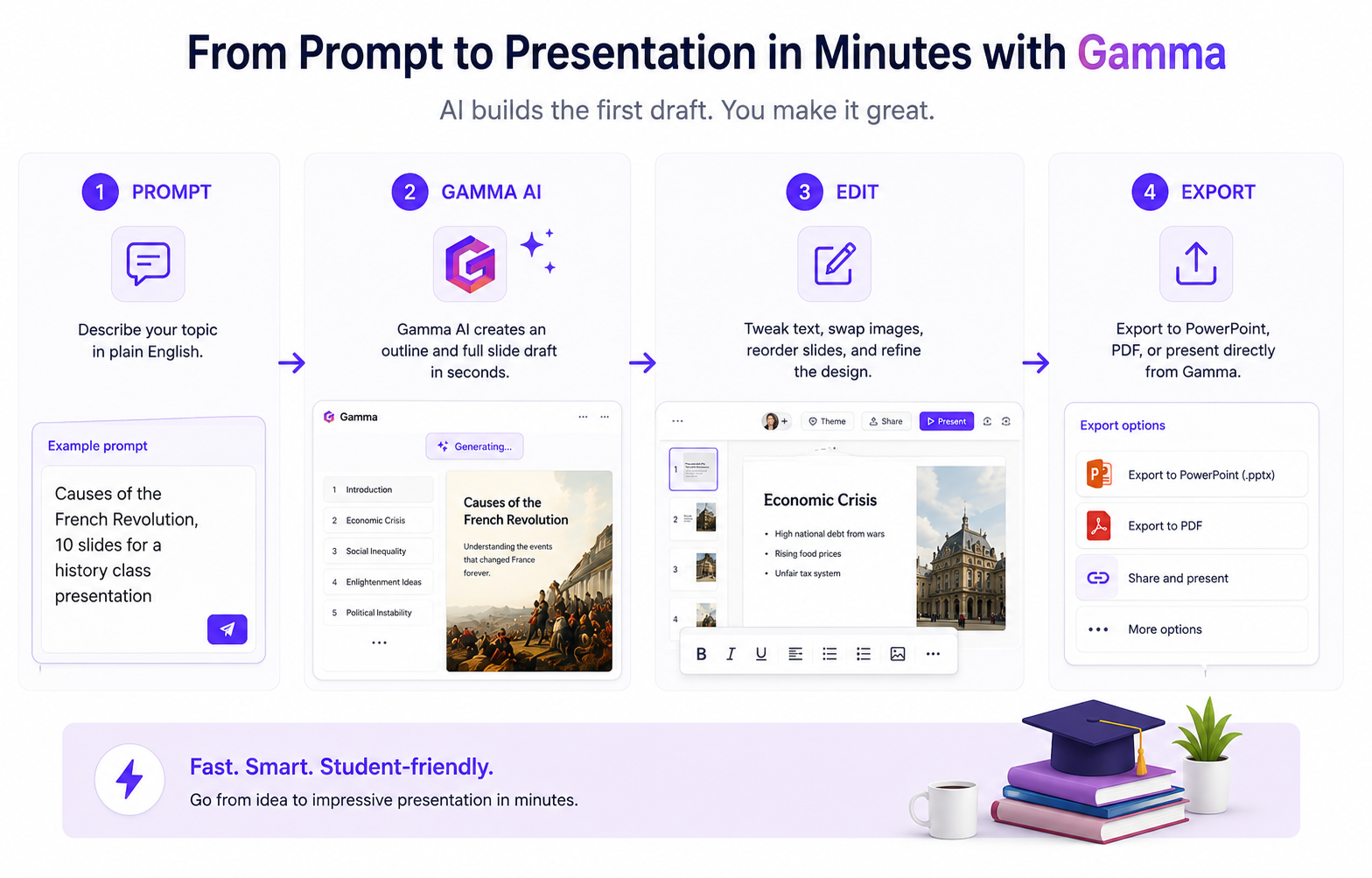
Why students like it: the output looks finished, not like a blank template you still have to design. In practice, a prompt like “causes of the French Revolution, 10 slides” produced structured slides with headings, bullet points, and stock images already placed. You edit rather than build from zero.
Watch out for: those 400 credits are a one-time allowance, not a monthly refill. Heavy users burn through them mid-semester. Free exports also carry a small “Made with Gamma” watermark, which you may not want on a graded deck. Gamma exports to PowerPoint and PDF, so you are not locked in.
Best for: regular class presentations where speed matters more than pixel-perfect branding.
Pricing: Free (400 one-time credits, watermark on exports). Plus is around $8 per month billed annually; Pro runs higher. Gamma has offered education discounts for verified students, so check the current rate before paying full price (Gamma pricing).
2. Canva: Best for Design Range (Mind the Student Rules)
Canva has the deepest library of templates, photos, and graphics of anything here, which makes it the pick for media, marketing, or arts assignments where the visuals carry the grade. Its Magic Design feature drafts a deck from a prompt, and Magic Write handles speaker notes and text expansion inside the editor.
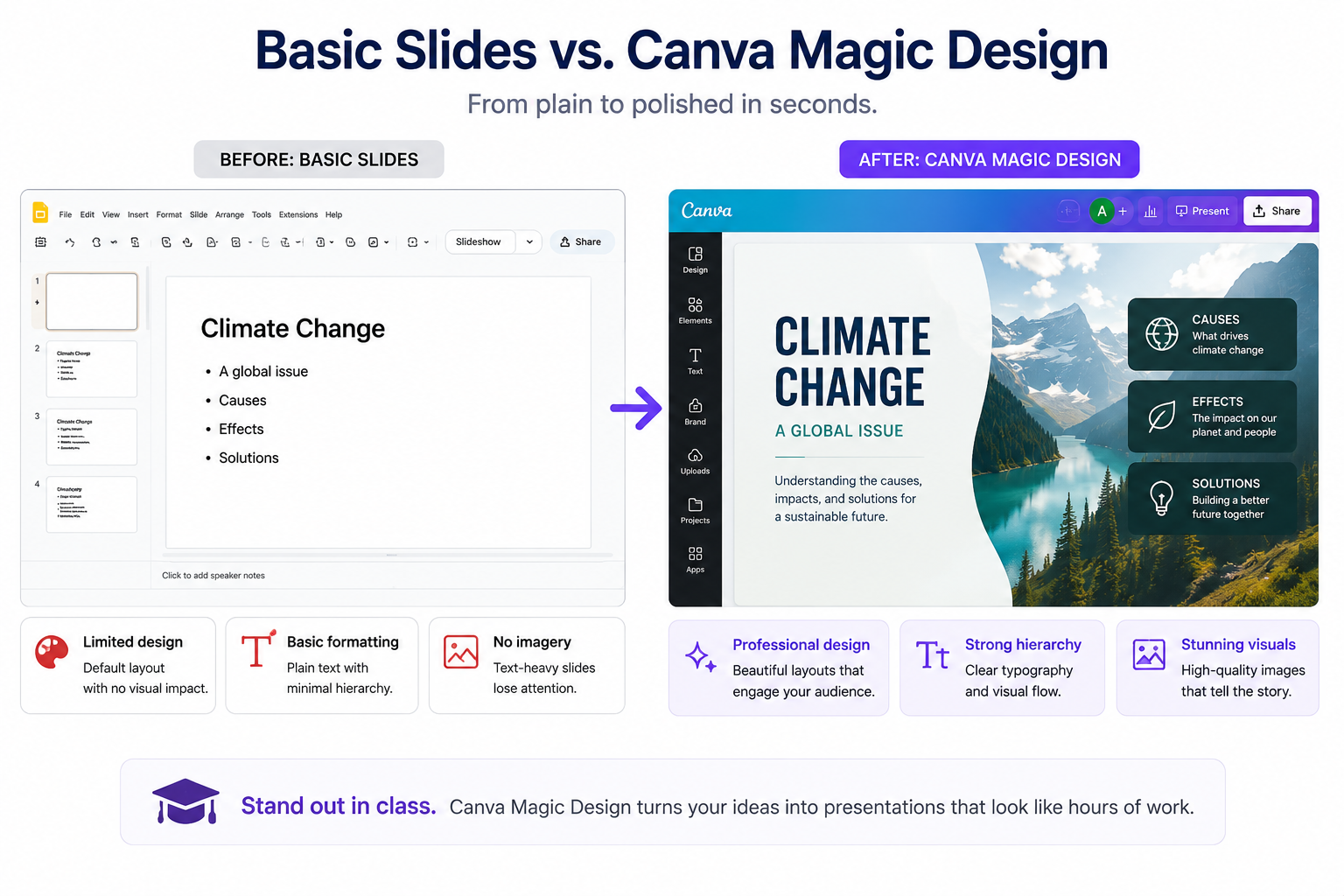
The eligibility catch most guides get wrong: Canva for Education is 100% free, but only for K-12 students and teachers. University students do not qualify for it. Colleges use a separate program, Canva for Campus, which is free only where your institution has signed up (Canva education eligibility). If your campus is not enrolled, you are on the standard free plan or a Canva Pro trial, and Magic Design sits behind Pro.
Best for: design-led assignments and anyone whose school offers Canva for Campus.
Pricing: Free plan available; Canva Pro is around $15 per month with a 30-day trial. Free for K-12 via Canva for Education; free for eligible universities via Canva for Campus.
3. Microsoft Copilot in PowerPoint: Best If Your University Gives You Microsoft 365
If your presentation has to open cleanly on a lecture-hall PC, nothing beats native PowerPoint, and Copilot builds decks inside it from a prompt or a Word document. Many universities hand students free Microsoft 365, which makes this the lowest-friction option for anyone already living in Office.
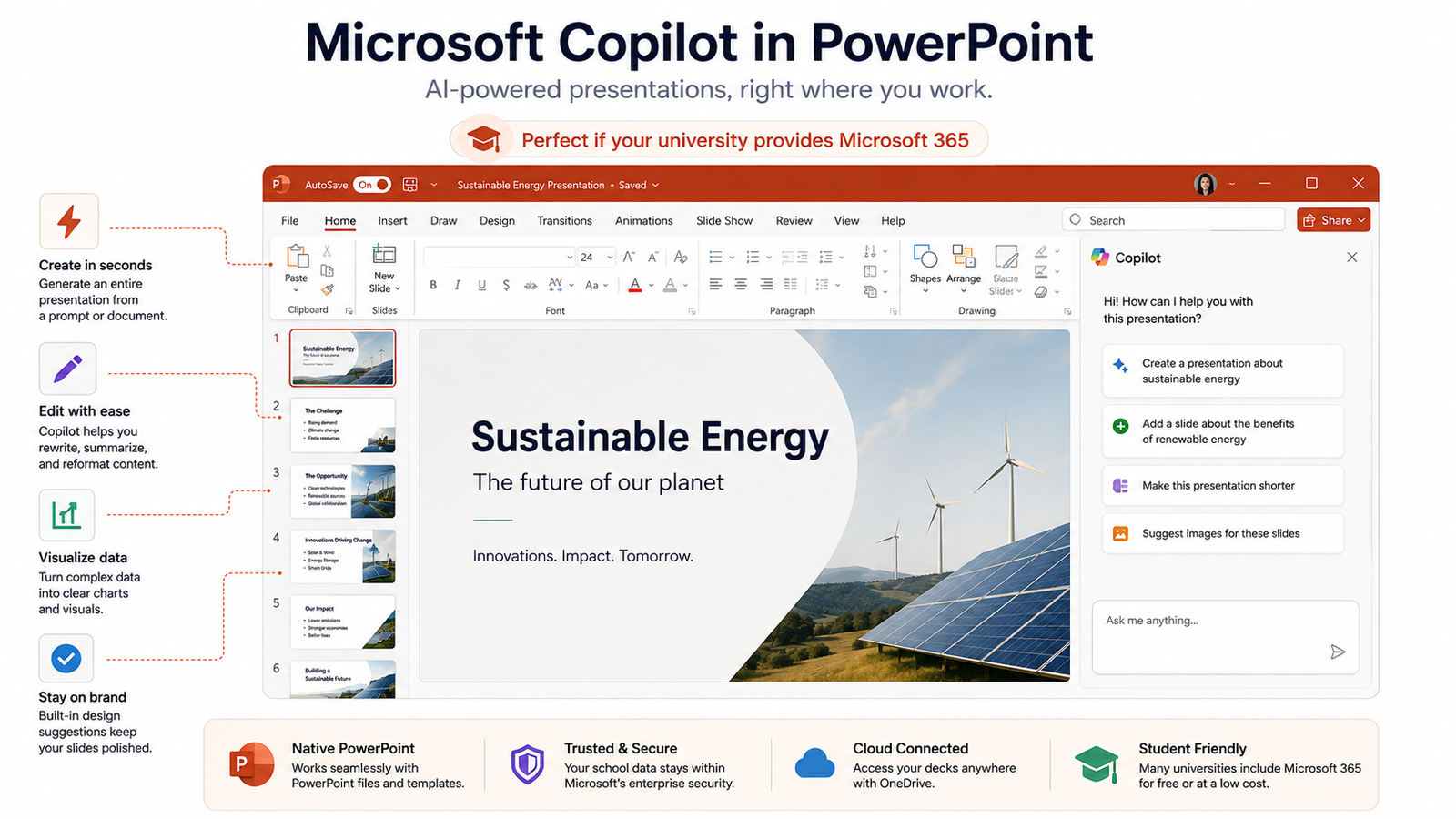
Read the license carefully. The free education plan (A1) does not include Copilot. Microsoft runs a separate offer giving verified college students 12 months of Microsoft 365 Personal, Copilot included, after which it renews at $19.99 per month (Microsoft Education). Confirm what your specific school license covers before you count on the AI features.
Best for: students who present from campus computers and want zero compatibility surprises.
Pricing: Free Microsoft 365 through many schools (Copilot often excluded); the student Copilot offer is 12 months free, then $19.99 per month.
4. Google Gemini in Google Slides: Best for Group Projects
For a group project, the tool that matters is the one everyone can edit at once without emailing files around, and that is Google Slides. Gemini now works inside Slides to draft content and generate images, and it comes free through Google Workspace for Education, which most schools already run (Gemini for Education).
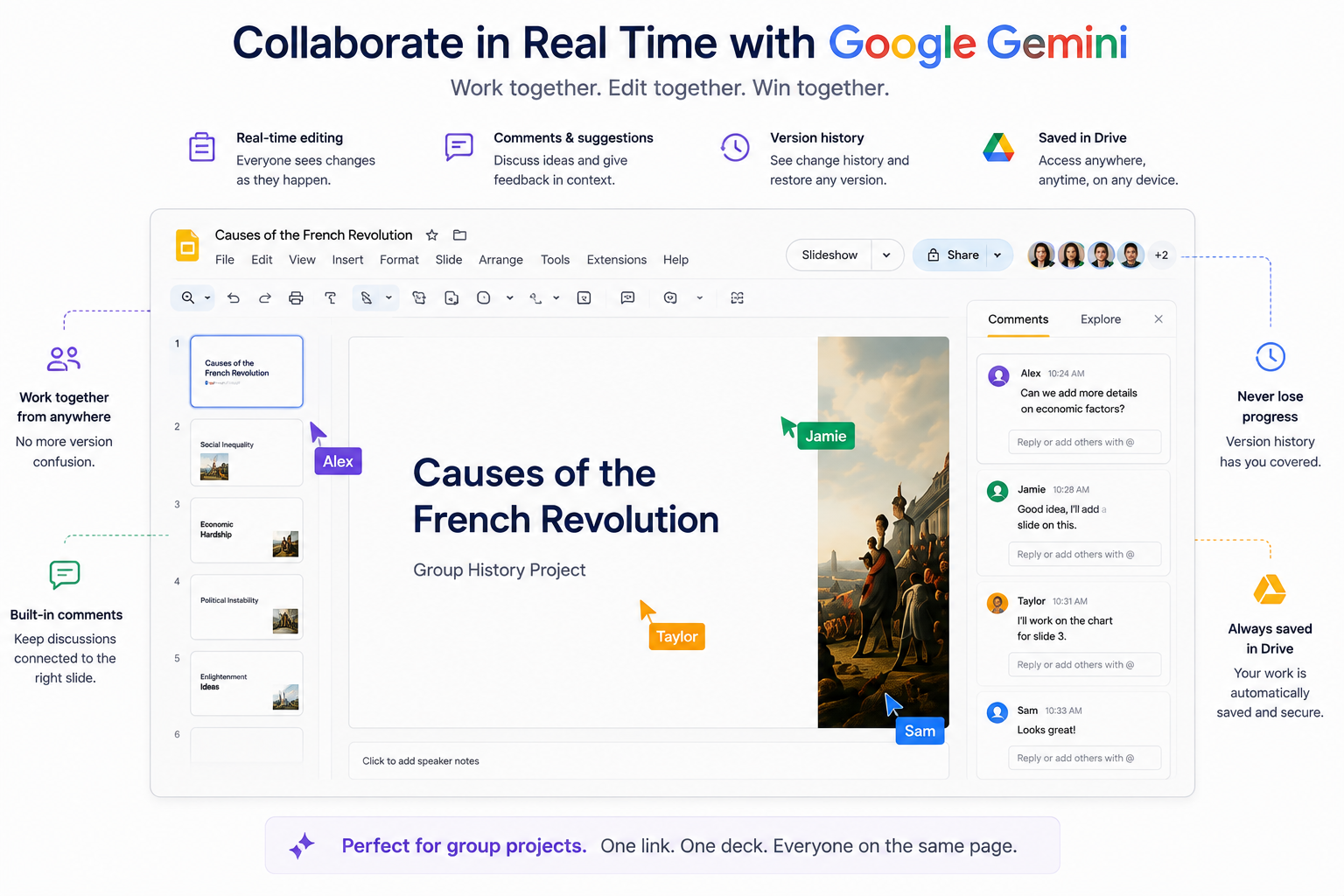
Why it wins for teams: real-time co-editing, comment threads, and version history are built in. Four people can work on the same deck the night before it is due, and nobody overwrites anybody. The AI features are provisioned by your school’s admin, so availability varies by campus.
Best for: group work and any class that runs on Google accounts.
Pricing: Free through a school Google Workspace for Education account. The consumer student promotion for Google AI Pro ended on 31 January 2026, so the school-account route is the reliable free path now.
5. Beautiful.ai: Best for Thesis and Defense Decks
When the stakes are a thesis defense or a capstone in front of faculty, first-draft quality matters, and Beautiful.ai produces the most presentation-ready slides of anything here. Its Smart Slide engine enforces clean design rules automatically, so charts stay aligned and layouts stay professional even if design is not your strength.
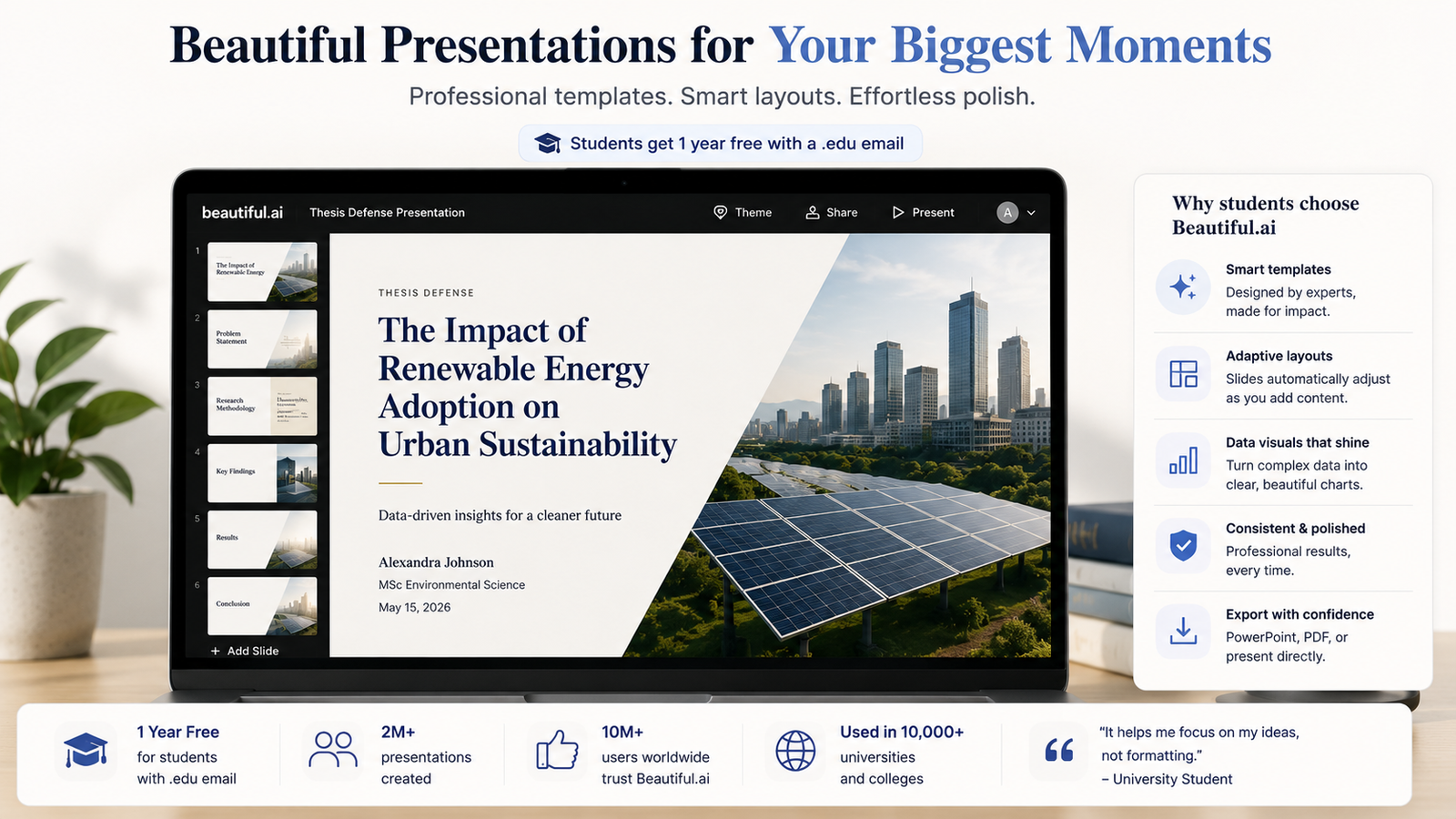
The student deal is genuinely good: Beautiful.ai offers a free year to students with a valid .edu email (Beautiful.ai for education). That covers exactly the multi-month stretch a dissertation deck needs. There is no permanent free tier otherwise, and the standard trial asks for a card.
Best for: data-heavy academic decks, defenses, and anything faculty will scrutinize.
Pricing: Pro is around $12 per month billed annually; free for one year with a verified .edu email.
6. Plus AI: Best for Editing Decks Inside Slides or PowerPoint
Not every deck starts from scratch. Plus AI is an add-on that generates and, more usefully, rewrites and restructures slides directly inside Google Slides and PowerPoint, so you keep working in the tool your class already uses. For polishing a rough draft into something coherent, it is one of the better editors.
The honest downside for students: there is no permanent free plan. You get a 7-day trial that requires a card, and there is no dedicated student discount at the time of writing (Plus AI pricing). It earns its place for editing power, not for being free.
Best for: students who already pay for it or want to fix an existing deck rather than generate a new one.
Pricing: No free plan; Basic starts around $10 per month, after a 7-day trial.
7. Decktopus: Best for Fast Class Presentations on a Budget
Decktopus strips presentation-making down to answering a few questions, then generates a deck with speaker notes and even suggested audience questions, which is handy practice before you present. It is aimed squarely at people who want a decent deck with minimal fuss and the lowest paid price on this list.
What you get free: a limited free tier of a few decks with a watermark, enough to try before committing. The paid plan is the cheapest here if you upgrade.
Best for: quick, standard class presentations where you value speed and price over deep customization.
Pricing: Limited free tier; Pro is around $6 per month billed annually.
How Does Each Tool Compare at a Glance?
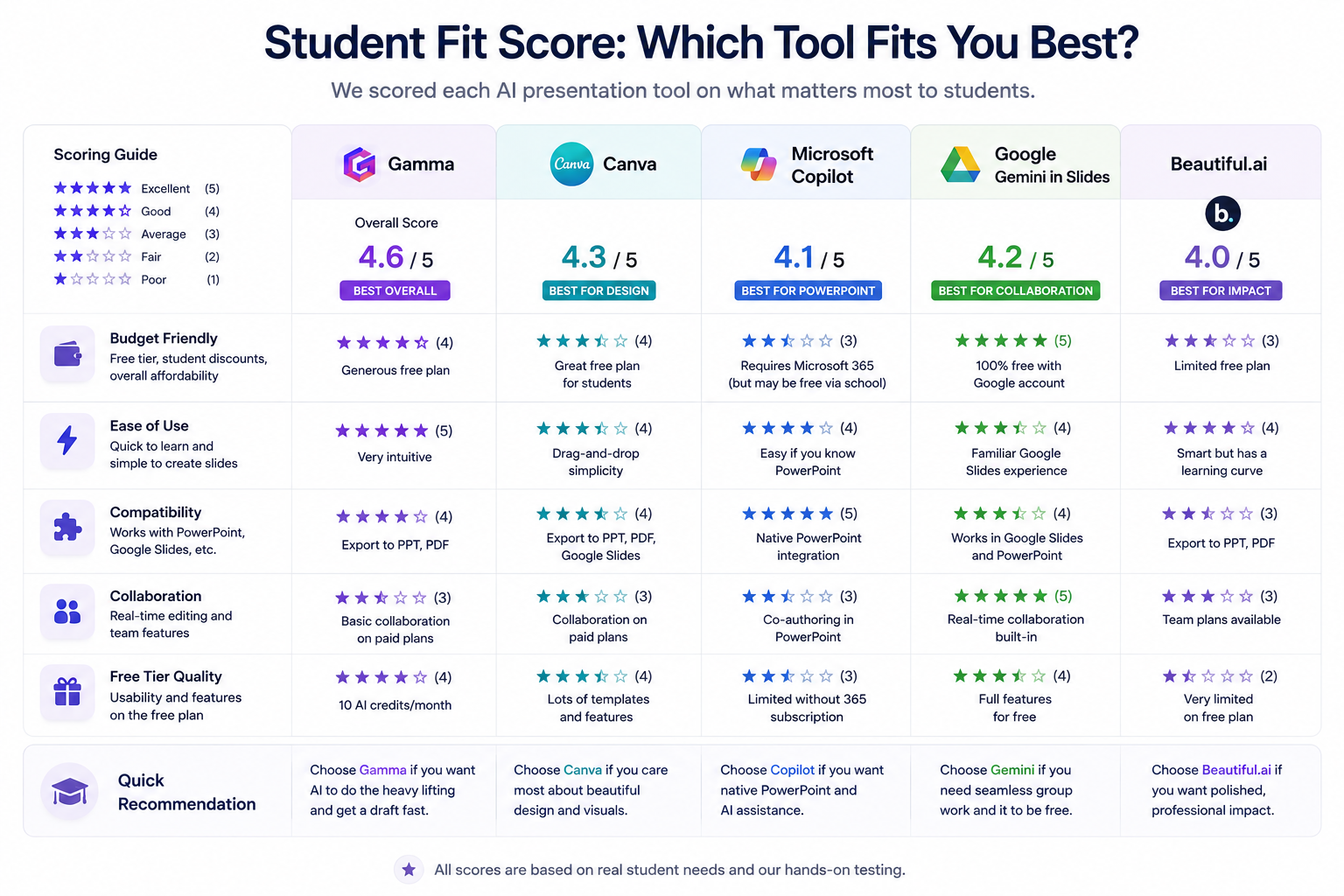
The single most useful filter for a student is not features, it is whether a genuine free path exists. Below, “student-fit score” is our own criteria-based rating from published features, pricing, and verified user reviews, not a single review-site average. Export column notes whether you can get a standard .pptx or .pdf out for a campus computer.
| Tool | Best for | Genuine free path for students? | Export | Student-fit score |
|---|---|---|---|---|
| Gamma | Fast decks overall | Partial (400 one-time credits) | PPTX, PDF | 4.6 |
| Canva | Design range | K-12 free; uni via Campus only | PPTX, PDF | 4.3 |
| Google Gemini in Slides | Group projects | Yes (via school Workspace) | PPTX, PDF | 4.2 |
| Copilot in PowerPoint | Microsoft 365 schools | Depends on school license | PPTX, PDF (native) | 4.1 |
| Beautiful.ai | Thesis and defense | Yes (free .edu year) | PPTX, PDF | 4.0 |
| Plus AI | Editing existing decks | No (7-day trial only) | Slides, PPTX (native) | 3.8 |
| Decktopus | Fast, cheap decks | Limited free tier | PDF, PPTX | 3.7 |
How Did We Choose These Tools?
We started from a longlist of 12 AI slide makers and cut anything a student cannot realistically use, then scored the rest against a student-weighted rubric. Every score in this guide traces back to these five criteria, not to a marketing page or a borrowed review average.
- Budget friendly: free tier, student discounts, and overall affordability.
- Ease of use: how quick it is to learn and to build a slide.
- Compatibility: does it work with PowerPoint, Google Slides, and a campus projector?
- Collaboration: real-time editing and team features for group work.
- Free-tier quality: how usable the free plan really is.
We dropped Tome, once a favorite on lists like this, because it discontinued its presentation product in April 2025, a reminder that this category churns fast. This is the student-specific counterpart to our workflow-focused presentations pillar guide: where that guide sorts tools by how you like to work, this one sorts them by what a student on a budget can actually access. No tool paid for placement.
Will Using an AI Presentation Tool Get You in Trouble?
Usually not, but it depends on your course, and the line is moving. In 2026, 12% of students admitted to putting AI-generated text straight into assessed work, up from 8% a year earlier and 3% in 2024 (HEPI, Student Generative AI Survey 2026). Universities have noticed. Policies now range from “encouraged with disclosure” to “banned for this assignment.”
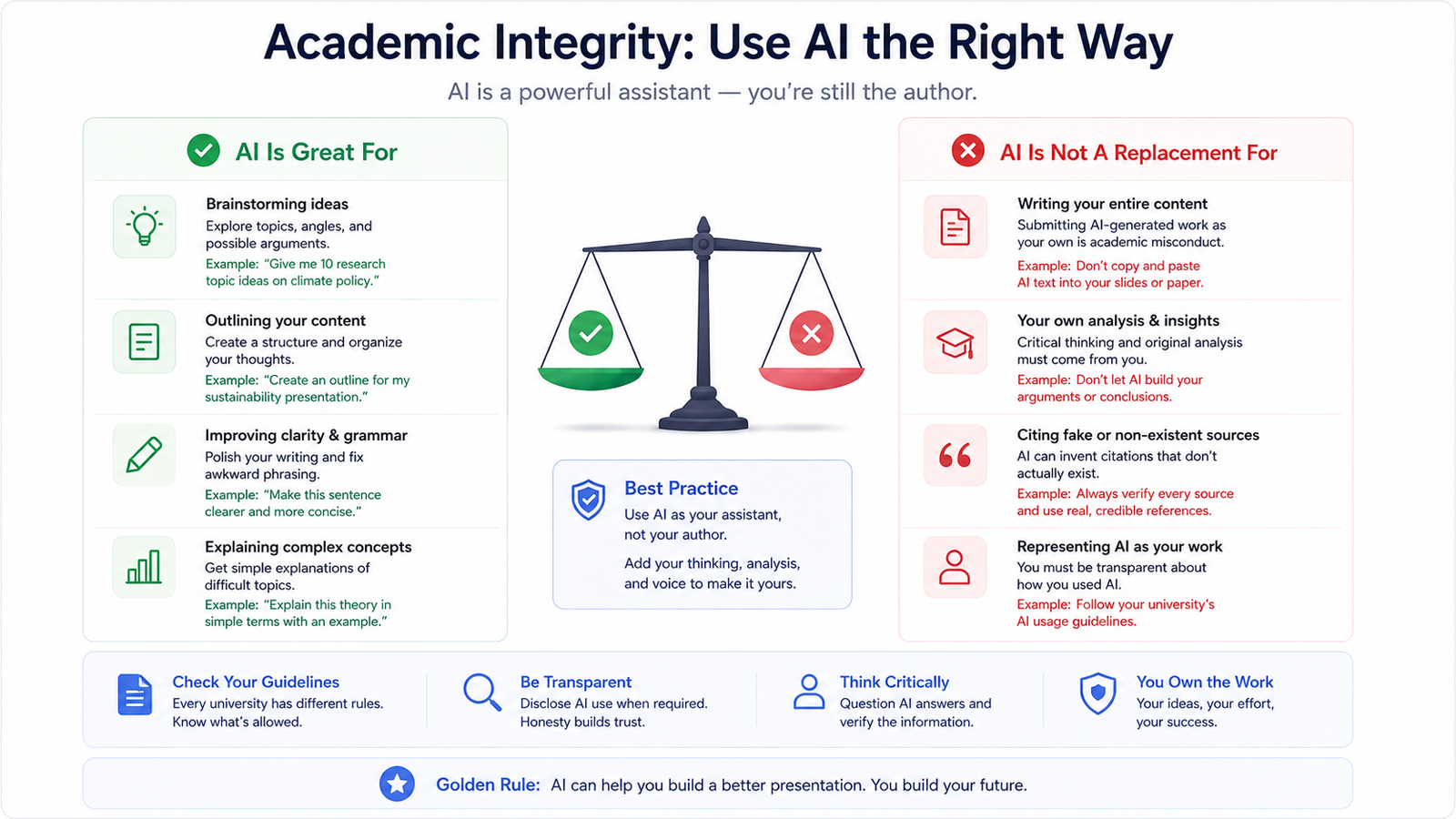
Using AI to build slide layouts and design is rarely the problem. The risk sits in the words and ideas on the slides. A 2025 study in Frontiers in Education found roughly three in four faculty had already encountered suspected AI-generated work (Frontiers in Education, 2025). Three habits keep you safe:
- Check the assignment’s AI policy first. If it is unclear, ask the instructor in writing.
- Write the substance yourself, then use AI for structure and design. The argument should be yours.
- Disclose if asked. A one-line note (“slide design assisted by Gamma”) costs nothing and protects you.
How Fast Are Students Adopting AI for Coursework?
Faster than almost any tool in memory. In 2026, 95% of UK undergraduates reported using AI in at least one way for their studies, and use specifically for assessments climbed from 53% in 2024 to 88% in 2025 to 94% in 2026 (HEPI, Student Generative AI Survey 2026). That is a full behavior shift in two academic years.
Younger students are close behind. In the United States, 26% of teens aged 13 to 17 said they had used ChatGPT for schoolwork by early 2025, double the 13% who said so in 2023 (Pew Research Center, 2025). By late 2025, 54% of US teens reported using AI chatbots for help with schoolwork generally (Pew Research Center, Teens, Social Media and AI Chatbots 2025).
The tools are riding a bigger wave. The presentation-software market was valued at about $7.27 billion in 2025 and is projected to reach $22.22 billion by 2033, with AI features named as a main driver (SNS Insider, 2025). For students, the practical upshot is that free tiers keep improving as vendors compete for the next generation of users.
Frequently Asked Questions
What is the best free AI presentation tool for students?
For a truly free path, Google Gemini in Slides (through a school Workspace account) and Beautiful.ai (a free year with a .edu email) are the most durable. Gamma is the best free starting point if you do not have those, though its 400 credits are one-time. In 2026, 94% of students used AI on assessed work, so free options keep expanding (HEPI, 2026).
Is Gamma free for students?
Gamma has a free plan with 400 AI credits, enough for several decks, but those credits are a one-time allowance, not a monthly refill, and free exports carry a watermark. Gamma has also offered education discounts on paid plans for verified students, so check the current rate on its pricing page before paying.
Can I use an AI presentation tool without it counting as cheating?
In most courses, yes, if you use it for design and structure rather than to write your analysis. Policies differ, and 12% of students in 2026 admitted pasting AI text directly into graded work, which is what draws scrutiny (HEPI, 2026). Check the assignment policy and disclose AI help if asked.
Gamma or Canva for a student presentation?
Choose Gamma when you want a finished deck from a prompt in under a minute. Choose Canva when the assignment is design-led and you need its huge template and asset library. Remember Canva’s free education tier is K-12 only; university students need Canva for Campus or a Pro plan for Magic Design.
How often is this list updated?
We review it each semester, because the category moves quickly. Tome’s shutdown in 2025 and the expiry of Google’s consumer student promotion in January 2026 both changed the picture within months, so pricing and free-tier details are re-checked against official pages at each update.
The Bottom Line: Which Should You Pick?
Start with Gamma for everyday class decks, since it is the fastest route from prompt to something you can present. For a group project, move to Google Gemini in Slides so everyone edits together. And for a thesis or defense, claim Beautiful.ai’s free .edu year for slides that hold up in front of faculty. Match the tool to the moment, and let the AI handle the layout while you own the argument.
Next, see our broader guide to AI presentation tools, our roundup of AI tools for college students, and, if you build data-driven slides, our picks for AI data-visualization tools. For PowerPoint specifically, our guide to AI tools for creating PowerPoint presentations goes deeper on that workflow.
Sources
All sources retrieved 2026-08-06.
- HEPI, Student Generative AI Survey 2026, retrieved 2026-08-06, https://www.hepi.ac.uk/reports/student-generative-ai-survey-2026/
- Pew Research Center, About a quarter of US teens have used ChatGPT for schoolwork, retrieved 2026-08-06, https://www.pewresearch.org/short-reads/2025/01/15/about-a-quarter-of-us-teens-have-used-chatgpt-for-schoolwork-double-the-share-in-2023/
- Pew Research Center, Teens, Social Media and AI Chatbots 2025, retrieved 2026-08-06, https://www.pewresearch.org/internet/2025/12/09/teens-social-media-and-ai-chatbots-2025/
- Frontiers in Education, Examining academic integrity policy and practice in the era of AI, retrieved 2026-08-06, https://www.frontiersin.org/journals/education/articles/10.3389/feduc.2025.1621743/full
- SNS Insider, Presentation Software Market to Reach USD 22.22 Billion by 2033, retrieved 2026-08-06, https://www.globenewswire.com/news-release/2025/11/27/3195545/0/en/Presentation-Software-Market-to-Reach-USD-22-22-Billion-by-2033.html
- Gamma pricing, retrieved 2026-08-06, https://gamma.app/pricing
- Canva education eligibility, retrieved 2026-08-06, https://www.canva.com/education/eligibility-guidelines/
- Beautiful.ai for education, retrieved 2026-08-06, https://www.beautiful.ai/education
- Microsoft Education, retrieved 2026-08-06, https://www.microsoft.com/education
- Google Gemini for Education, retrieved 2026-08-06, https://edu.google.com/ai/gemini-for-education/
- Plus AI pricing, retrieved 2026-08-06, https://plusai.com/pricing/
Not sure these tools are worth it in the first place? See our honest take on whether AI presentation tools are worth it, with the real pricing and trade-offs.
Teaching rather than studying? Our companion guide to the best AI presentation tools for teachers ranks tools by classroom fit and student-data privacy.

Richard Johnson
Richard Johnson is an AI specialist at one of the world's largest technology companies, where he has spent the past three years helping organizations adopt AI. CognitiveFuture extends that work publicly: gathering the available evidence on each tool, from vendor documentation to independent reviews and user feedback, combined with hands-on testing where we have done it and said so, and cutting a crowded market down to the right choice for the job in front of you.